
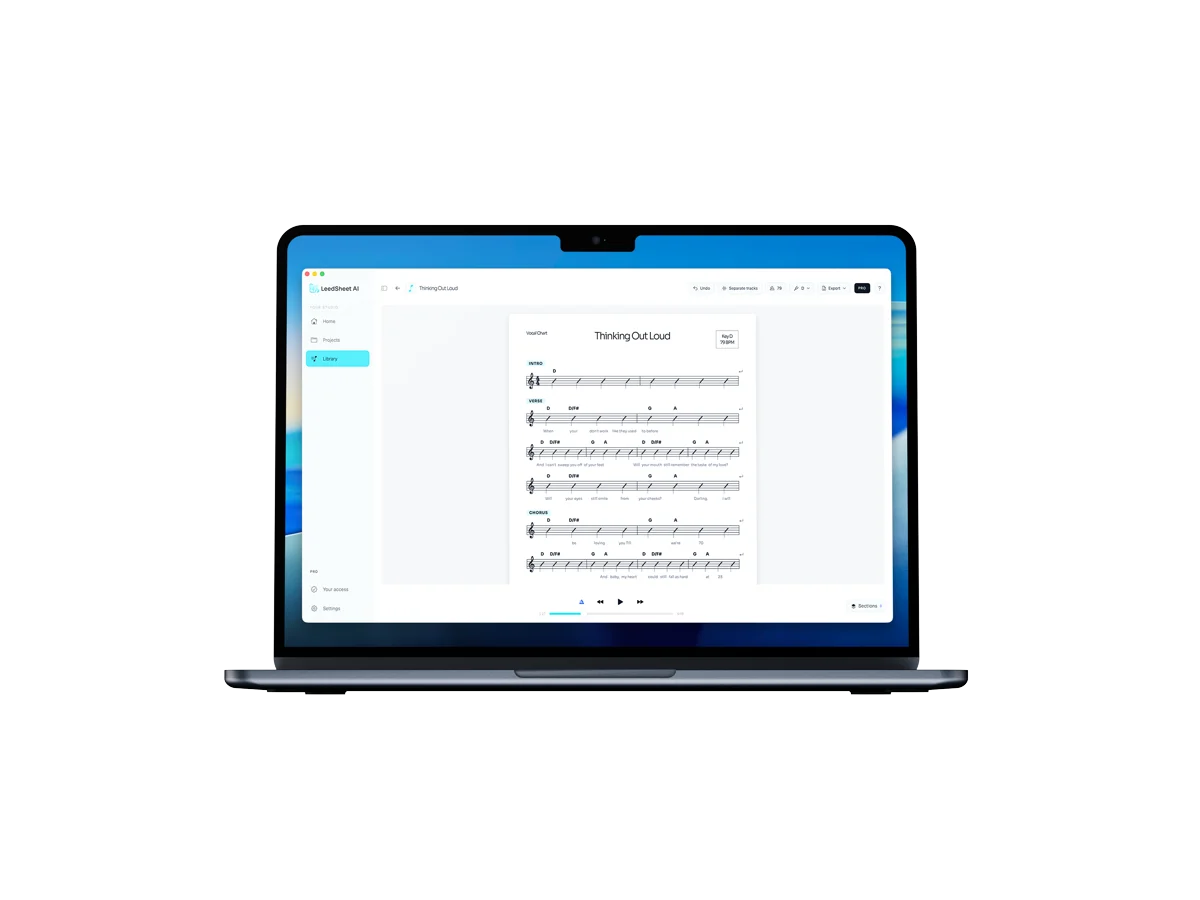
AI chord chart transcription means giving software an audio file — a studio recording, a live bootleg, a voice memo — and getting back a written chart: the chord progression laid out over measures, with the key and BPM identified. What used to take a musician an afternoon of rewinding and guessing now takes seconds, and the result is editable, so you fix the details instead of starting from silence.
This guide covers what the AI actually detects, where it beats transcribing by ear (and where it doesn’t), and how to get from audio to a rehearsal-ready chart.
What the AI actually detects
A chord chart is more than chord names. A useful AI transcription identifies four things at once:
- Chords — the progression as standard symbols (C, Am7, F#m, Bb), placed where they change.
- Key — the tonal center of the song, so you know what you’re transposing from.
- BPM — the tempo, which turns a list of chords into something a band can count in.
- Measures and structure — chords aligned to bars, so the chart reads like music instead of a lyrics-site chord dump.
What the model is doing under the hood
Chord recognition from audio is a stack of steps, and knowing them tells you where errors come from:
- Beat and downbeat tracking. The system first finds the pulse and where each bar starts. Everything downstream hangs off this — if the downbeat is wrong, correct chords land in the wrong measures.
- Harmonic feature extraction. The audio is reduced to a representation of which pitch classes are sounding over time, independent of octave and timbre.
- Chord decoding. A model maps those features to chord labels over time, constrained so the output looks like plausible music rather than a new chord every fraction of a second.
- Key estimation. The distribution of pitches and chords across the whole song points at a tonal center.
That ordering explains the failure modes. A track with a strong, clear pulse and clearly voiced harmony transcribes almost perfectly. A rubato intro, a half-time feel, or a wash of reverb and distortion attacks step 1 or step 2, and the errors show up as chords in the right order but the wrong place.
Why stem separation helps
Splitting the recording into vocals, drums, bass and everything else before analysis removes two of the biggest sources of confusion: the percussion, which contributes energy but no harmony, and the lead vocal, whose notes are melody rather than chord tones. The harmonic instruments get analysed with less competing signal. It’s also what makes a chart rehearsable — you can mute the vocal and play under it, or solo the bass to check what the root actually is where the AI hesitated.
Transcribing by ear vs. AI transcription
Ear transcription is a real skill and it’s worth having. But for the everyday job of “I need this song charted before Thursday’s rehearsal,” the comparison is lopsided:
| By ear | With AI | |
|---|---|---|
| Time per song | 30 minutes to several hours | Seconds, plus a quick review |
| Skill required | Trained ear, theory knowledge | Ability to read a chord chart |
| Key and BPM | Manual, easy to get wrong | Detected automatically |
| Output | Whatever you wrote down | Editable, exportable chart |
| Weak spot | Slow, fatiguing | Dense mixes may need corrections |
The honest version: AI gets you most of the way instantly, and your ears finish the rest. That beats doing all of it by hand for almost every practical use.
AI transcription vs. looking the song up
There’s a third option people reach for first: search the song title and copy whatever a chord site shows. It’s free and it’s instant, and it has three costs that only show up at rehearsal.
| Chord lookup sites | AI transcription | |
|---|---|---|
| Coverage | Popular songs only | Any audio file you have |
| Source of truth | Someone’s guess, sometimes years old | The recording you’re actually playing to |
| Which recording | Unspecified — often a different key or arrangement | The exact file you imported |
| Measures | Chords over lyrics, no bar durations | Chords over numbered bars |
| Your own material | Not there at all | Works the same as anything else |
| Editing | Copy into another document | Editable where it was generated |
The killer is the third row. Chord pages rarely say which version they transcribed, so the key you find is frequently not the key on the record your band is learning from — and never the key your vocalist needs. And the moment the song is a demo, a rehearsal recording, or something you wrote, lookup stops being an option entirely.
Which audio gives the best result
You don’t need a studio master, but the input does affect the output:
- Best: a mixed studio recording with audible harmonic instruments — piano, guitar, strings, pads.
- Fine: live recordings, rehearsal room audio, a phone memo of someone playing the song.
- Harder: very dense or heavily distorted mixes, solo-percussion sections, tracks where the harmony is implied rather than played.
- Trim first: if the file has thirty seconds of crowd noise or a spoken intro, cut it. The analysis is about the song, not the room.
How to transcribe a song into a chord chart
- Import the audio. Any file you have — it doesn’t need to be a clean studio master.
- Generate with AI. The model analyzes the recording and produces the chart: chords, measures, key and BPM in one run.
- Review, edit and export. Check the handful of places where the mix is dense, add section labels (verse, chorus, bridge), and export an editable chart for your band or your files.
That’s the entire workflow in LeedSheet. You can try the full product free on macOS and generate your first chart before deciding anything.
What AI gets right — and where you still edit
Being straight about the limits is the difference between a tool you trust and a demo. AI transcription is consistently strong on clearly voiced progressions, key detection and tempo. Where you’ll occasionally step in:
- Dense or heavily produced mixes — layered synths and distortion can mask chord tones.
- Extensions and slash chords — the AI may hear C where the pianist played C/E, or simplify a 9th to a triad.
- Your arrangement vs. the recording — if your band plays it differently, you’ll adapt sections anyway.
This is why the chart being editable is not a nice-to-have. The AI produces the first version; your musical judgment ships the final one. If you’re deciding between chart formats first, see chord chart vs. lead sheet.
Frequently asked questions
How accurate is AI chord chart transcription?
On most studio recordings, the large majority of chords, the key and the BPM come out correct. Dense mixes or unusual voicings can produce occasional errors — you review and correct in minutes instead of transcribing from zero.
Can AI detect the key and BPM of a song?
Yes, and reliably — tempo and key detection are the most mature parts of AI music analysis. Both are reported with every LeedSheet chart.
Do I need music theory to use it?
No. The output is standard chord symbols over measures. If you can read a chord chart, you can play from the result.
Can it transcribe a song I wrote myself?
Yes, and this is where it beats every chord-lookup site: they only have songs someone else already transcribed. Any audio file works the same way — a demo, a voice memo, a rehearsal recording.
Does it work on live recordings?
Usually. Live audio has more bleed and more room, so expect a few more corrections than on a studio mix. Trim applause and spoken intros before importing — the analysis should start where the music does.
Can I change the key after transcribing?
Yes. Once the chart exists, transposing is arithmetic the software does for you — see how to transpose a chord chart for what happens to the spelling when you do it by hand.